
Wordless Desktop architecture
Desktop system map
Section titled “Desktop system map”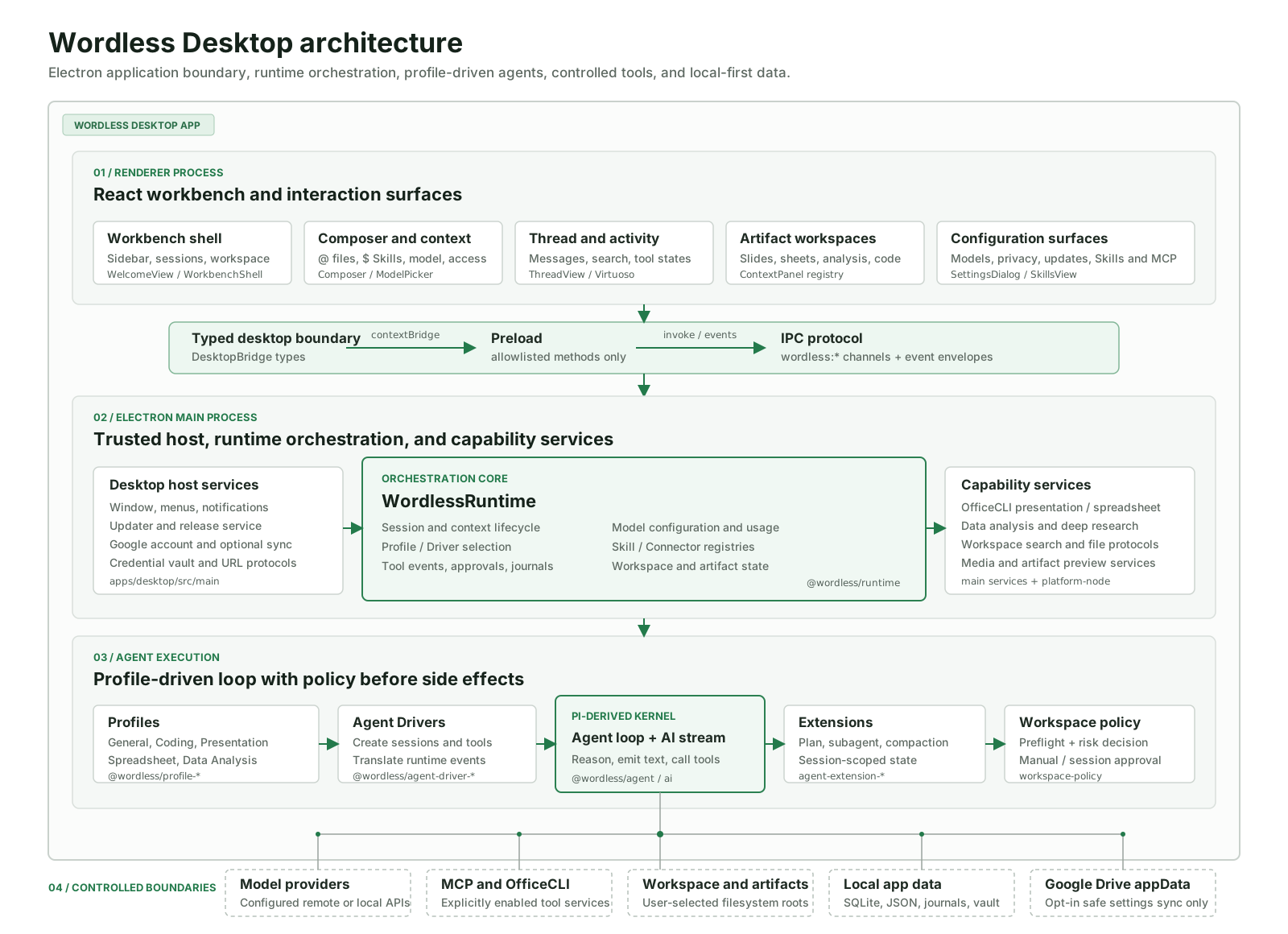
This diagram covers Wordless Desktop only. It starts with the React workbench, crosses the typed Preload Bridge and IPC boundary, enters WordlessRuntime in Electron Main, and expands into Profiles, Drivers, the Pi-derived agent loop, extensions, policy, capability services, and local data. Open the image for the full-size version.
Layer responsibilities
Section titled “Layer responsibilities”| Layer | Main location | Responsibility | Boundary |
|---|---|---|---|
| Renderer Process | apps/desktop/src/renderer |
Workbench, Composer, threads, search, approval cards, artifact previews, Settings, Skills & MCP | Has no direct Node.js or arbitrary IPC access |
| Preload + DesktopBridge | apps/desktop/src/preload, apps/desktop/src/bridge |
Exposes typed, allowlisted methods and events through contextBridge |
Renderer cannot construct arbitrary IPC channels |
| Electron Main Process | apps/desktop/src/main |
Windows, menus, updates, notifications, account, cloud sync, credentials, and protocols | Owns OS permissions and resource lifecycles |
| WordlessRuntime | packages/runtime |
Sessions, context, model configuration, Profile/Driver selection, tool events, approvals, Skill/Connector registries | Does not depend on a specific Renderer component |
| Profiles | packages/profile-* |
Defines instructions, defaults, and connectors for General, Coding, Presentation, Spreadsheet, and Data Analysis | Declares a work mode without executing tools |
| Agent Drivers | packages/agent-driver-* |
Creates agent sessions, assembles tools, and translates kernel events into Runtime events | Decoupled through the Driver SDK |
| Agent kernel + extensions | packages/agent, packages/ai, packages/agent-extension-* |
Model streaming, agent loop, tool calls, planning, subagents, and context compaction | The Pi-derived kernel cannot bypass Wordless policy |
| Workspace policy | packages/agent-workspace-policy |
Checks paths, access level, and risk before execution and produces approval decisions | Approval precedes side effects |
| Capability services | apps/desktop/src/main, packages/platform-node |
OfficeCLI, data analysis, deep research, workspace search, media, and preview protocols | Called through Main/Runtime only |
| Persistence | packages/persistence, Electron userData, workspace |
SQLite, JSON, session journals, credentials, workspace files, and artifacts | Local by default; safe settings sync is opt-in |
Request flow
Section titled “Request flow”- Composer combines text,
@file or folder references,$Skills,!task context, model, thinking depth, and access level into a structured submission. DesktopBridgesends an allowlistedwordless:*IPC request through Preload; Renderer never calls Node.js directly.- Main delegates to
WordlessRuntime, which loads the session, Profile, Driver, enabled Skills, Connectors, and Extensions. - The Driver creates the matching agent session. The Pi-derived loop calls the configured model and streams text or tool calls.
- Before a tool runs, Workspace Policy checks workspace scope, access mode, and risk. Runtime emits an approval event and pauses when a user decision is required.
- Approved work runs through a Main capability service, built-in tool, or enabled MCP. Results enter the session journal and return to Renderer as running, success, or failed events.
- The thread and artifact workspace consume those events. Presentation, Spreadsheet, and Data Analysis previews refresh when their artifacts change.
Data and network boundaries
Section titled “Data and network boundaries”- Always local: workspace files, session journals, SQLite data, artifacts, API keys, and OAuth credentials.
- Sent per task: only prompt and context required by the current request go to the selected model provider.
- Explicitly enabled: an MCP connector exposes tools only after configuration and enablement; risky calls still require approval.
- Optional sync: Google Drive
appDataFolderreceives allowed preferences and safe model metadata only after Cloud Sync is enabled.